Bildestørrelse og oppløsning

Fototeknikk, Fototeori

Bildestørrelse og oppløsning er to begreper som fort kan skape forvirring i forbindelse med digitale bilder. Årsaken er at de hver for seg kan vise til helt forskjellige ting, og i noen tilfeller også handle om det samme.

Bildestørrelse brukes som betegnelse på:

  • Antallet bildepunkter i et bilde
  • Størrelse på bildet ved utskrift
  • Hvor mye lagringsplass bildet tar på minnekortet eller datamaskinen.

Oppløsning brukes om:

  • Antallet bildepunkter i et bilde
  • Hvor mange bildepunkter man har per cm eller tomme ved utskrift

Med et kamera med en sensor på 20 MP (megapiksler) kan du ta bilder med rundt regnet 20 millioner bildepunkter. Jo flere bildepunkter du har, jo større må da bildet selvsagt bli. Samtidig er det slik at jo flere bildepunkter et bilde har, jo flere detaljer kan det gjengi. Jo flere detaljer et bilde kan gjengi, jo bedre oppløsning har bildet. Figur 1 viser begge forhold: Flere bildepunkter gir både større bilde og bedre oppløsning.
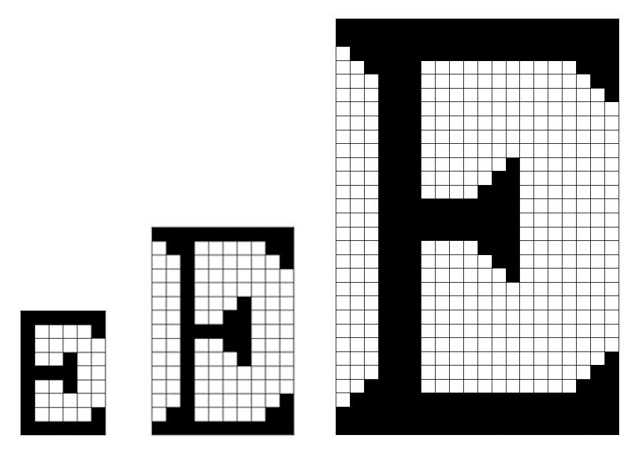
Figur 1.

Ved utskrift handler naturlig nok bildestørrelse om hvor stort bildet blir i cm eller tommer (2,54 cm per tomme). Også her handler oppløsning om hvor mange detaljer som gjengis, men nå forstått som en kvalitet bestemt av hvor mange bildepunkter utskriften har per cm eller tomme. Jo flere bildepunkter per cm/tomme, jo bedre oppløsning. Dersom man forsøker å skrive ut et bilde i en størrelse som er for stor i forhold til antall bildepunkter i bildet, vil man kunne se bildepunktene som større eller mindre ruter. Dette skjer fordi de relativt få bildepunktene som bildet har, må forstørres for at de skal fylle tilstrekkelig med plass for at bildet skal bli stort nok.

Med andre ord, jo større et bilde er i antall bildepunkter, jo større format kan det skrives ut i med god gjengivelse av detaljer. La oss tenke oss at hver rute som bildene i figur 1 er satt sammen av representerer 100 bildepunkter. Da vil det minste bildet være 6 x 100 bildepunkter = 600 bildepunkter bredt. Beste trykkekvalitet i ukeblad/magasin krever rundt 300 bildepunkter per tomme. Med andre ord ville det minste bildet bli 600 bildepunkter : 300 bildepunkter/tomme = 2 tommer bredt (5,08 cm). Det største bildet ville være 20 x 100 bildepunkter = 2000 bildepunkter i bredden, med en trykkestørrelse på 2000 bildepunkter : 300 bildepunkter/tomme = 6,7 tommer (16,9 cm). Det er altså antallet bildepunkter som i stor grad avgjør kvaliteten på trykk i forhold til trykkestørrelsen, i alle fall i utgangspunktet. Kvaliteten på bildepunktene og på papiret spiller også inn.

Merk at bildepunktene må stå mye tettere i en utskrift enn på skjerm, for å si det slik. Med en skjermoppløsning på 1920 bildepunkter i bredden, vil et bilde med samme antall bildepunkter, fylle hele skjermen (i prinsippet uansett skjermstørrelse), mens bildet trykket i beste kvalitet vil bli litt mindre enn bildet på 2000 bildepunkter i eksemplet ovenfor (nærmere bestemt 16,25 cm). Det er med andre ord ikke uten videre mulig å få gode utskrifter av bilder man henter på nettet. Til det er oppløsningen på nettbildene som regel for lav.

Figuren viser hvor stort et bilde fra et kamera på 18 MP er i forhold til skjerm, og til et bilde tilpasset visning på internett (f.eks. 600 x 400 bildepunkter). Når man henter opp et bilde fra kameraet på datamaskinen, får man som regel se hele bildet. Det er programvare i datamaskinen som sørger for dette. Det er gjerne ikke før man åpner bildet i 100% størrelse i et bildebehandlingsprogram at man oppdager hvor stort et bilde direkte fra et kamera i dag er. Mens nettbildet vil få en bredde på ca. 5 cm i beste kvalitet på trykk, vil et bilde på 18 MP kunne fylle en flate tilsvarende et oppslag på to sider i et magasin i A4-format.

Til sist, eller kanskje helt først, er bildekvaliteten avhengig av hvor mye plass bildet får lov til å oppta på minnekortet/datamaskinen. Aller best kvalitet får man om man tar bilder i RAW-format. Da lagres all informasjon fra kameraets sensor i bildefilen. Mitt kamera Canon EOS 5D mkIII, tar RAW-filer på 23-30 megabyte. Velger jeg å ta bilder direkte i JPG-format, foretar kameraet en redigering og komprimering av opptaket i henhold til den bildestilen som kameraet er innstilt på, og så kastes resten av informasjonen fra sensoren. Et JPG-bilde med størrelse L (22 MP) vil oppta 4-9 megabyte plass. Bilder i størrelse M og S vil da selvsagt ta enda mindre plass, og samtidig gi bilder med dårligere oppløsning.

Så et svært viktig sluttpoeng: Bildekvalitet i form av oppløsning/detaljrikdom er ikke nødvendigvis sikret om du benytter innstillingen med størst antall bildepunkter (L). På kameraet kan nemlig også stilles inn såkalt «bildekvalitet». Dette handler om hvor mye bildet skal bli komprimert for å oppta mindre plass på minnekortet/datamaskinen, og med dette også hvor mange detaljer som gjengis.

Valg for bildekvalitet på Canon-kamera.

På bildet som viser valg for bildekvalitet på Canon-kamera, står altså bokstavene L, M og S for bildestørrelse ut fra antall bildepunkter i bildet. Vi finner to valg per størrelse, ett for fin kvalitet, og ett for ikke fullt så fin kvalitet (mer komprimert bilde som tar mindre plass på minnekortet). På en del andre kamera, f.eks. Nikon, velges størrelse for seg, og kvalitet relatert til komprimering for seg.
Størst mulig dybdeskarphet

Fototeknikk, Fototeori

Særlig naturfotografer ønsker stor dybdeskarphet i en del landskapsbilder, og noen lurer på hva de må gjøre for å få bilder med skarphet som for eksempel strekker seg fra blomster i svært nær forgrunn til fjell i bakgrunnen.

Det er flere faktorer som avgjør dybdeskarpheten, altså det området innover i bildet vi opplever som akseptabelt skarpt:

  • Blenderen. Mindre blenderåpning, dvs. større blenderverdi (f-verdi) gir større dybdeskarphet.
  • Brennvidden (hvor mye vi zoomer ut/inn). Kortere brennvidde (zoom ut) gir større bildevinkel og større dybdeskarphet.
  • Avstanden til punktet vi fokuserer på. Større avstand gir større dybdeskarphet.

Særlig det siste punktet må kommenteres videre. Selv om dette stemmer i og for seg, er det nemlig ikke alltid slik at du får størst dybdeskarphet ved å fokusere på det som er lengst vekk. Det stemmer godt hvis du skal ta bilder av månen som stiger opp bak noen fjell i det fjerne. Enten du fokuserer på fjellene eller månen vil dybdeskarpheten uansett strekke seg helt fra fjellene (jorden) til månen.

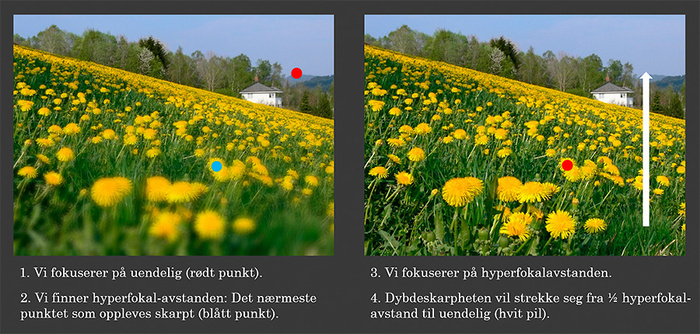
Men forholdet blir noe annerledes dersom du ønsker størst mulig dybdeskarphet i et landskapsbilde, der både svært nær forgrunn og en bakgrunn uendelig lang borte ønskes skarp. Da vil profesjonelle og dyktige amatører forholde seg til hyperfokalavstanden. Dette er det nærmeste punktet som ser skarpt ut når objektivet er innstilt på uendelig, og er nedblendet. At objektivet er nedblendet betyr at den aktuelle blenderåpningen er fysisk aktivert i objektivet. På moderne kameraer blir lyset for en gitt blenderverdi beregnet matematisk ut fra lyset som kommer inn med største blenderåpning innstilt. Derfor ser vi normalt aldri gjennom et nedblendet objektiv. Den valgte blenderåpningen (innsnevringen av åpningen) blir aktivert bare akkurat idet bildet blir tatt, så for å kunne se den aktuelle dybdeskarpheten må den innstilte blenderåpningen aktiveres (snevres inn) manuelt uten at det tas bilde. Det gjøres med en spesiell knapp/funksjon på kameraet.

Dersom det ikke er slik «dybdeskarphetsknapp» på ditt kamera, kan du bruke tabell som viser dybdeskarpheten i meter/fot for ulike blenderverdier ved ulike brennvidder. Videre er det mange objektiver som har dybdeskarphetsskala ved siden av avstandsindikatoren, men dette mangler gjerne på nyere objektiver.

Når hyperfokalavstanden er funnet (altså det nærmeste punktet som virker skarpt når objektivet er innstilt på uendelig og er nedblendet), flytter man fokus til nettopp dette punktet. Da vil dybdeskarpheten strekke seg fra midt mellom fotografen og hyperfokalavstanden og til uendelig. I praksis betyr dette at man fokuserer på noe som ligger litt lenger unna enn det nærmeste man vil ha skarpt.

Hyperfokalavstanden vil være forskjellig for ulike kombinasjoner av blenderverdier og brennvidder. Tar vi utgangspunkt i folke-speilreflekskameraer (APS-C-sensor) vil bilder med ekstremt stor dybdeskarphet gjerne være tatt med brennvidder ned mot 10 mm, og med blenderverdier fra f/11 og oppover (høyere verdi), og da selvfølgelig med bruk av hyperfokalavstands-prinsippet (se illustrasjon nedenfor).

Merk ang. punkt 2: Vurderingen gjøres med nedblendet objektiv f.eks. ved bruk av dybdeskarphetsknapp på kameraet.

Exposure explained by a Circle – Tutorial

Egne prosjekter, Fototeknikk, Fototeori

A photographer is a person who writes or draws with light. Hence photography is very much about controlling light. Photographs are made as a light sensitive material within the camera (the sensor) is exposed to light, and a good photographer knows how to let the right amount of light onto the sensor.

So exposure is all about controlling light, and understanding exposure is all about knowing how to make the available light into the right amount of light for the photograph you want to bag.

The Exposure Triangle
I assume you’ve studied the exposure triangle, still I don’t take this for granted in this article so don’t worry if you haven’t. The exposure triangle is a model for introducing and explaining tools for controlling the amount of light, among other things. These tools are:
The aperture: An adjustable opening, usually in the lens, for regulating the flow of available light entering the camera. The shutter: A physical mechanism or an electronic function that controls for how long the flow of light entering the camera is recorded by the sensor. The time span is usually referred to as «shutter speed» or «exposure time». The ISO-setting: An electronic function within the camera calculating the sensor’s «sensitivity» to light, an analogy to photographic film’s physical sensitivity to light.

The Four Section Exposure Circle
But there are actually more tools for controlling the flow of available light into the camera! These are the tools for controlling, influencing or even creating the available light itself:

  • Flashguns
  • Light panels
  • Lamps
  • Reflectors
  • Filters
  • Screens etc.

We are not going to explore this latter group of tools as such, but I find this group crucial to mention as I now introduce the four section exposure circle model (FOURSEC) where these tools belong to the section of lighting (representing the available light). The advantage of the FOURSEC model is that it links exposure to the very lighting situation, both directly and visually, a feature lacking in the exposure triangle model.

Hence we have four «entities» in the FOURSEC that together make up the exposure (the complete circle), fig. 1:

  • The lighting (representing the total of available light, natural and/or artificial)
  • The aperture (representing the opening regulating the flow of available light into the camera)
  • The exposure time (representing the time span for the recording of the light flowing into the camera)
  • The ISO-setting (representing the sensor’s sensitivity to the light flow)

Mutually dependent settings
These entities depend on each other. If you change one entity, you have to adjust one or more of the other three to maintain the same amount of light for your exposure. Say a cloud comes in front of the sun and you get less available light (the lighting section of the circle becomes smaller), fig. 2:

To keep the circle full (the full sircle representing the ideal exposure), this reduction of the lighting section has to be compensated by increasing one or more of the other sections. In fig. 2 I have increased the ISO-setting (section) and kept the apeture and exposure time (sections) unchanged. So if the available light is decreasing, you can for instance increase the ISO-setting (set a higher ISO value to make the sensor more sensitive to light) to obtain the same exposure result.

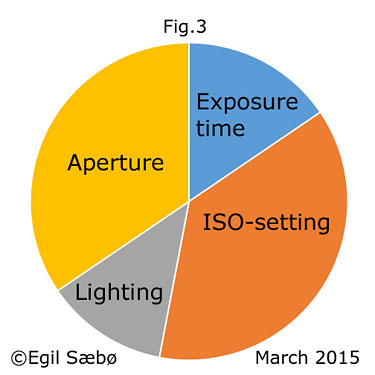
Say you now also want to make sure that you avoid unsharp images due to camera shake, so you opt for a shorter exposure time (faster shutter speed). The available light is still the same, and you stick to the same ISO-setting. If you then reduce the exposure time (section) the only option you’ve got is to increase the aperture (section) and thus increase the flow of light into the camera, fig. 3:

Again the FOURSEC explains the situation perfectly (fig. 3): To maintain the amount of light ideal for the exposure we have to increase the aperture (the opening, the flow of light) as the light will be flowing onto the sensor for a shorter period of time.

Please note that I by the term aperture refer to the physical size of the aperture, not the f/number as the latter would not work in this model as a larger f/number means less light through the lens!


Explaining how a photograph was taken
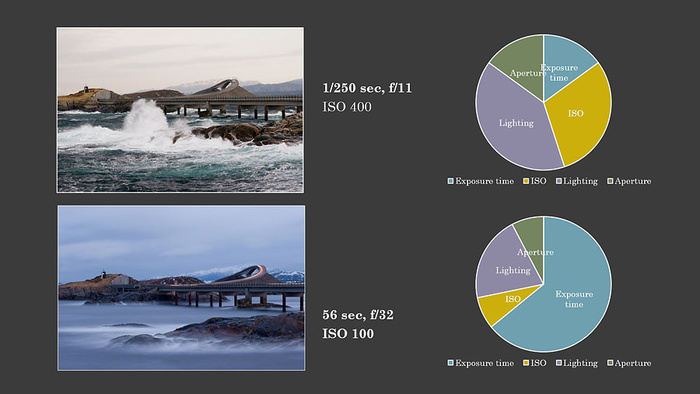
In addition to being a tool for understanding exposure as such, the FOURSEC can be used for visualizing the settings for a photograph when explaining how the picture was taken. See fig. 4 with pictures from the Atlantic Road in Norway:


Fig. 4


The upper picture was taken on an overcast day around noon. To stop the motion of the waves I opted for a relatively short exposure time (1/250 sec.). I also wanted a great depth of field (DOF) and consequently chose aperture f/11(greater f-number gives greater depth of field, but a smaller physical aperture). Giving priority to a short exposure time, and a relatively small aperture, I had to increase the ISO to obtain the ideal exposure. (As the sun alone provided the available light for the landscape, I could not increase the lighting.)

The lower picture was also taken on an overcast day but this time in the afternoon. This means that the lighting was on the decrease, hence the smaller lighting section in the lower circle compared to the upper circle. In this picture I wanted to have light trails from the cars for the whole visible distance of the road. As the cars were in the frame for ca. 55 seconds, I had to use an exposure time a bit longer than this and opted for 56 seconds (with the camera on a tripod). This is a very long time for letting light into the camera, so to get the ideal exposure I had to narrow down the aperture as much as possible to strain the flow of light (f/32), and in addition I had to make the sensor very little sensitive to light (reduce the ISO setting considerably).

Use of filters included
What then if the lighting had been stronger (if the lighting section of the circle had been larger)? Say I was already using the smallest possible aperture on my lens, and the lowest possible ISO setting on my camera, so these section of the circle could not be made smaller. If there was more available light (a larger lighting section) I would then have to reduce the exposure time (section) and I would not have managed to capture light trails all the way in the photo. I could of course have waited until dusk, but there would actually have been an other way around the problem. Now the introduction of the lighting section becomes even more useful. If there is too much available light, you can simply apply a tool for reducing the available light. By fitting a neutral density filter (ND filter) to the front of the lens you can stop some of the light from entering the camera. And voilà, the lighting section is reduced, allowing you to increase the exposure time (section) enough to get those light trails all the way! You are suddenly able to control every single section of the circle, and the FOURSEC model explains it all.

Win some, lose some
Exposure is all about balancing or giving priority to settings, about winning some and losing some. What you win or lose are for instance: You win a larger depth of field (DOF) by decreasing the aperture (larger f/number), but you lose light and must compensate by using a longer exposure time and/or a lager ISO setting. The larger ISO setting you use in this situation the shorter exposure time you win. So by increasing the ISO you may regain the exposure time you had before decreasing the aperture, say if you want to both freeze action/movement and win a large DOF at the same time. By using a larger ISO setting, however, you lose technical image quality, so this setting should be balanced to what other kinds of quality you want to win or lose in your picture, i.e. DOF or sharpness of moving objects. (When increasing the ISO setting the camera turns up the light volume electronically, and noise from the system will show in the image (grain and colour specks). You will also have photos with less detail in them as they actually will be underexposed at the outset.)

It is important to note that the sections in the FOURSEC model cannot be compared to each other mathematically. The model does not work like a traditional statistics pie with sections derived from calculations based on one specific entity. Exposure times are measured in seconds. Apertures as such are measured in millimetres, and the value representing the camera’s sensitivity to light is, well ISO. Thus the FOURSEC is to be applied and read only as a symbolic reference to the lighting conditions and the camera settings.

The Exposure Triangle explained by a Circle

Egne prosjekter, Fototeknikk, Fototeori

Introducing the Four Section Exposure Circle

This post was updated 25 May 2015. I now use the term exposure time synonymous with shutter speed as exposure time corresponds better to the principles of the model.

Having worked as a photography teacher for many years I have tried out different methods for teaching my students the basics of photography. Like so many others I have often referred to, and have had some success with, the exposure triangle. An other model that has come in handy is the analogy of filling cups of different sizes (ISO-settings) with water (light) from a tap with different openings (apertures) within a certain period of time (exposure time/shutter speed), the water pressure in the pipe representing the available light.

Nevertheless, I have missed a model that could explain it all in one go, visually. That’s why I recently ended up developing the four section exposure circle (let’s name it FOURSEC for short). I don’t know if anybody else has done it. After I came up with the idea I’ve searched the internet for the same concept. So far I’ve only found a few other photographers that operate with a circle as a tool for explaining exposure, albeit all of them divide their circle, or «pie», into three sections representing the three settings that we find in the traditional exposure triangle: the ISO-setting, the aperture and the shutter speed (exposure time in my model).

In my FOURSEC, however, I have added the value of lighting. Thus my model includes the available light as a part of the picture (pun intended). This is nothing new when it comes to exposure, of course, and we find this value also in the «water-tap analogy», and probably also in other analogies and explanations. The big difference is that my model links the value of lighting to the three settings of the exposure triangle in one single visual presentation. After all, the available light will be the basic value in all photography situations and our choices for the three settings are always (if we cannot control the light) determined by it.

I believe the FOURSEC offers valuable help to beginners as it connects the exposure triangle settings directly to the actual photography situation. As the circle has to remain complete all the time, the model clearly shows that a change in the lighting necessitates an adjustment of at least one other setting, as well as allows for the adjustment of as many of the remaining settings as you wish. As a teacher I find this particularly beneficial when explaining the ISO-setting.

If the amount of light is decreasing, you can for instance increase the ISO-setting.

When reading fig. 1 and then fig. 2 we actually get a visual impression of the operation: the lighting section decreases while the ISO section increases. This visual impression should make the actual adjustment and the interaction of settings so much easier to understand and remember.Having increased the ISO-setting for operating in a darker environment, you might also want to reduce the exposure time to secure sharp images while working with your camera handheld. Now pretending that the sections representing lighting and ISO are fixed, the model tells us that in order to reduce the exposure time (section) we have to widen the aperture (section). Again the FOURSEC explains the situation perfectly (fig. 3).

Please note that I by the term aperture refer to the actual opening and its physical size, not the f/number as the latter would not work in this model as a larger f/number means less light through the lens!

As a photography teacher I see the advantage of including the available light in the model also in the sense that it helps students to see that there is no such thing as the one correct combination of settings, neither in itself nor for a certain lighting situation. And if one should wonder, more or less available light must lead to a change in one or more settings. These facts are obvious to the experienced. To the beginners they are not. I know. I teach them, and I have been asked questions over and over again that I know this model will help answer.

It actually surprises me that I’ve never thought of this model before, or never have seen it developed by someone else. At the same time it doesn’t surprise me that much. Experienced photographers know things too well to see the issues from the beginners’ point of view. We do not see the blank spots in our explanations as we’ve already got the complete picture in our minds.

In addition to being a tool for teaching/learning exposure as such, the FOURSEC can be used for visualizing the settings for a photograph when explaining how the picture was taken (fig. 4 below).


Fig. 4

It is important to note that the sections in the FOURSEC model cannot be compared to each other mathematically. The model does not work like a traditional statistics pie with sections derived from calculations based on one specific entity. Exposure time is measured in seconds. Apertures as such are measured in millimetres, and the value representing the camera’s sensitivity to light is, well ISO. Thus the FOURSEC is to be applied and read only as a symbolic reference to the lighting conditions and the camera settings.

I hope my Four Section Exposure Circle will be of help both to teachers and students of photography when facing the basic challenges of exposure.

See also this tutorial based on the model.